This was annoying. iTunes 7.7 quit playing tracks--any tracks, not just DRM-infested ones--on my Vista installation recently. There was no sound after hitting play and the playhead would not progress. I ran down the suggestions from Apple about this problem to no avail.
After googling, I discovered this post where the author had trouble with video playback after attaching a ReadyBoost-configured USB drive. Sure enough, I removed my ReadyBoost drive and rebooted, and voila--iTunes is again playing songs.
Friday, August 15, 2008


Thursday, July 17, 2008
PerformancePoint 2007 Monitoring Server permissions
The Monitoring Server component of PerformancePoint 2007 is responsible for managing the user rights as far as being able to publish dashboards, edit existing dashboards, etc. This article got me most of the way there in understanding how to set up user permissions, but I think it's helpful to point out a few other items.
Dashboard Designer is the interface for Monitoring Server user security.
This was not immediately clear to me. There are two basic aspects to the permissions: global permissions (such as administrator rights, being able to publish new dashboards, etc.) and per-Dashboard permissions.
To configure server (global) role assignments:
In Dashboard Designer, hit the Office button and then the Options button on the resulting menu:

On the resulting Server tab, hit the Connect button:

Once it logs in, hit Permissions:

On the resulting Permissions dialog, you can add users in DOMAIN\name form, specifying their server (global) role:

To configure permissions for individual dashboards:
Open the desired dashboard On its Properties tab, there is a Permissions section at the bottom:

Add your users (DOMAIN\name format again) and specify Reader or Editor roles. After changing these permissions, you must publish the dashboard.
Dashboard Designer is the interface for Monitoring Server user security.
This was not immediately clear to me. There are two basic aspects to the permissions: global permissions (such as administrator rights, being able to publish new dashboards, etc.) and per-Dashboard permissions.
To configure server (global) role assignments:
In Dashboard Designer, hit the Office button and then the Options button on the resulting menu:

On the resulting Server tab, hit the Connect button:

Once it logs in, hit Permissions:

On the resulting Permissions dialog, you can add users in DOMAIN\name form, specifying their server (global) role:

To configure permissions for individual dashboards:
Open the desired dashboard On its Properties tab, there is a Permissions section at the bottom:

Add your users (DOMAIN\name format again) and specify Reader or Editor roles. After changing these permissions, you must publish the dashboard.
Vista Page File in Netherworld
I had an odd problem with a Windows Vista SP1 installation. I suddenly began getting "your computer is low on memory" warnings when nothing really had changed with the way I use the machine. I looked at Task Manager and saw that it was showing page file use of ~1700M / ~1800M. When I went to Advanced System Settings (System Properties) to examine the page file size (Advanced tab, Performance settings, then the Advanced tab again) it showed the total page file size as.... 0 MB!
I knew I had enabled a page file previously when I set up the machine, so I rebooted--and it still showed 0 MB for the page file size. So, I went to assign a new 4096 MB page file. When I did this, it gave me a message stating that pagefile.sys already existed (!) and asked if I wanted to overwrite it. I half expected the machine to die painfully when I approved this action, but it did not... and knock on particleboard, I haven't gotten any of the warnings since.
I knew I had enabled a page file previously when I set up the machine, so I rebooted--and it still showed 0 MB for the page file size. So, I went to assign a new 4096 MB page file. When I did this, it gave me a message stating that pagefile.sys already existed (!) and asked if I wanted to overwrite it. I half expected the machine to die painfully when I approved this action, but it did not... and knock on particleboard, I haven't gotten any of the warnings since.
Thursday, July 10, 2008
WCF in .NET 3.5 SP1 and Enterprise Library - TypeInitializationException
I have been fighting a maddening issue. It seems that if you have a WCF service under the .NET 3.5 SP1 beta that is impersonating the caller--either using the ServiceModel pipeline or ASP.NET Compatibility Mode--calls to Enterprise Library assemblies (at least for logging or data access needs) will fail with the following exception:
Here's the thread over on the Enterprise Library forums where I was corresponding about the issue.
"The type initializer for 'Microsoft.Practices.EnterpriseLibrary.Logging.LogEntry' threw an exception."When you dig for the inner exception, you find:
Could not load file or assembly 'System.Management, Version=2.0.0.0, Culture=neutral, PublicKeyToken=b03f5f7f11d50a3a' or one of its dependencies. Access is denied.I've tried numerous things to get around this, such as:
- Changing the application pool identity to Local System
- Directly referencing System.Management in the service assembly
- Adding System.Management (and the Ent Lib assemblies, for that matter) to the <assemblies> node in the web.config
<client>Then, for some reason, an IIS reset was needed to make the client start working. This article describes the problem in detail.
<endpoint address="http://server/WcfService1/Service1.svc"
binding="basicHttpBinding" bindingConfiguration="BasicHttpBinding_IService1"
contract="ServiceReference2.IService1" name="BasicHttpBinding_IService1"
behaviorConfiguration="endpointBehavior"/>
</client>
<behaviors>
<endpointBehaviors>
<behavior name="endpointBehavior">
<clientCredentials>
<windows allowedImpersonationLevel="Impersonation"/>
</clientCredentials>
</behavior>
</endpointBehaviors>
</behaviors>
Here's the thread over on the Enterprise Library forums where I was corresponding about the issue.
Friday, June 27, 2008
Silverlight and REST for corporate (intranet) applications
Danger Will Robinson, Silverlight 2 beta 2's WebClient implementation does not support passing integrated security credentials. I was hoping to implement a RESTful services tier for my intranet Silverlight application using Windows Integrated Security. While this does work brilliantly when using IE as a client, the Silverlight client cannot call the services. There seems to be no good workaround: I could use ASP.NET authentication services using Forms authentication against AD, but I would have to present the client with a login prompt.
FYI, the service configuration for WCF REST and integrated security is as follows:
FYI, the service configuration for WCF REST and integrated security is as follows:
<system.serviceModel>
<behaviors>
<endpointBehaviors>
<behavior name="webBehavior">
<webHttp/>
<!--<enableWebScript/>-->
</behavior>
</endpointBehaviors>
</behaviors>
<serviceHostingEnvironment aspNetCompatibilityEnabled="true" />
<bindings>
<webHttpBinding>
<binding name="integratedWebHttpBinding">
<security mode="TransportCredentialOnly">
<transport clientCredentialType="Windows"/>
</security>
</binding>
</webHttpBinding>
</bindings>
<services>
<service name="AppNamespace.Service">
<endpoint address=""
behaviorConfiguration="webBehavior"
binding="webHttpBinding"
bindingConfiguration="integratedWebHttpBinding"
contract="AppNamespace.Service" />
</service>
</services>
</system.serviceModel>
Wednesday, June 25, 2008
MOSS and Kerberos on Windows Server 2008 - a gotcha
I've been through the Kerberos mill repeated times--getting the SPNs lined up, making sure the computer and service accounts are trusted for delegation, making sure the times on the servers are within 15 minutes, etc. But I couldn't make Kerberos authentication work on my MOSS web applications on a Windows Server 2008 server.
I opened a ticket on this with Microsoft and discovered that IIS 7.0 has kernel mode authentication turned on by default. MOSS has a problem with this and it will completely break Kerberos for those web applications. To turn this off:
In Server Manager, select the web application for which you want to fix Kerberos authentication:

Select its Authentication tool:

Now choose Advanced Settings:

Finally, make sure the "Enable Kernel-mode authentication" checkbox is UNCHECKED:
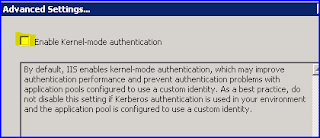
Apply your changes and you should be good to go. It is not necessary to reset IIS or bounce the application pool to make it take effect. Don't forget that you still have to configure the web in MOSS Central Administration to use Kerberos (Negotiate) authentication instead of NTLM in addition to all the other normal domain-based Kerberos setup steps. Cheers.
** UPDATE 24 Mar 2009 **
Apparently the kernel mode authentication setting also breaks NTLM authentication on WS 2008, so this is not specific to making Kerberos work.
I opened a ticket on this with Microsoft and discovered that IIS 7.0 has kernel mode authentication turned on by default. MOSS has a problem with this and it will completely break Kerberos for those web applications. To turn this off:
In Server Manager, select the web application for which you want to fix Kerberos authentication:

Select its Authentication tool:

Now choose Advanced Settings:

Finally, make sure the "Enable Kernel-mode authentication" checkbox is UNCHECKED:

Apply your changes and you should be good to go. It is not necessary to reset IIS or bounce the application pool to make it take effect. Don't forget that you still have to configure the web in MOSS Central Administration to use Kerberos (Negotiate) authentication instead of NTLM in addition to all the other normal domain-based Kerberos setup steps. Cheers.
** UPDATE 24 Mar 2009 **
Apparently the kernel mode authentication setting also breaks NTLM authentication on WS 2008, so this is not specific to making Kerberos work.
Friday, June 13, 2008
Moving Silverlight 2 beta 1 applications to beta 2
With new times come a new Silverlight beta, released last week. I set out to update my beta 1 applications to beta 2. First, I let it run the project through the upgrade wizard. After that, I found there were several more steps, starting with fixing your installation...
Remove and Re-Add System.Windows References
 This includes:
Make this change in App.xaml and any other user control (*.xaml) objects.
From:
From:
Find the Silverlight control on the web page(s) in your site and update the node accordingly, from:
This prevents 404 errors when calling my web services.
From:
Remove and Re-Add System.Windows References
This includes:- System.Windows
- System.Windows.Browser
- System.Windows.Controls.Data
- System.Windows.Controls.Extended (this one will likely not be needed now as many controls have moved into the base assemblies)
Make this change in App.xaml and any other user control (*.xaml) objects.
From:
xmlns="http://schemas.microsoft.com/client/2007"To:
xmlns="http://schemas.microsoft.com/winfx/2006/xaml/presentation"This avoids mystery "invalid XAML" errors from the Silverlight control on web pages:
Sys.InvalidOperationException: Invalid XAML for control 'Xaml1'. [] (line 1, col 229): The element is not valid in the given namespace.Update the Deployment Node Namespace in AppManifest.xaml
From:
<Deployment xmlns="http://schemas.microsoft.com/client/2007/deployment" xmlns:x="http://schemas.microsoft.com/winfx/2006/xaml" EntryPointAssembly="HCHB.ServiceRequests" EntryPointType="HCHB.ServiceRequests.App" RuntimeVersion="2.0.30226.2">To:
<Deployment xmlns="http://schemas.microsoft.com/client/2007" xmlns:x="http://schemas.microsoft.com/winfx/2006/xaml" EntryPointAssembly="HCHB.ServiceRequests" EntryPointType="HCHB.ServiceRequests.App" RuntimeVersion="2.0.30523.6">Update the Silverlight Control Declaration
Find the Silverlight control on the web page(s) in your site and update the node accordingly, from:
<asp:Silverlight ID="Xaml1" runat="server" Source="~/ClientBin/Silverlight1.xap" Version="2.0" Width="100%" Height="100%" />To:
<asp:Silverlight ID="Silverlight1" runat="server" Source="~/ClientBin/Silverlight1.xap" MinimumVersion="2.0.30523" Width="100%" Height="100%" />Change the Cross-Domain Access Policy
This prevents 404 errors when calling my web services.
From:
<?xml version="1.0" encoding="utf-8"?>To:
<access-policy>
<cross-domain-access>
<policy>
<allow-from>
...
<?xml version="1.0" encoding="utf-8"?>
<access-policy>
<cross-domain-access>
<policy>
<allow-from http-request-headers="*">
...
Subscribe to:
Posts (Atom)
